
Anúncios
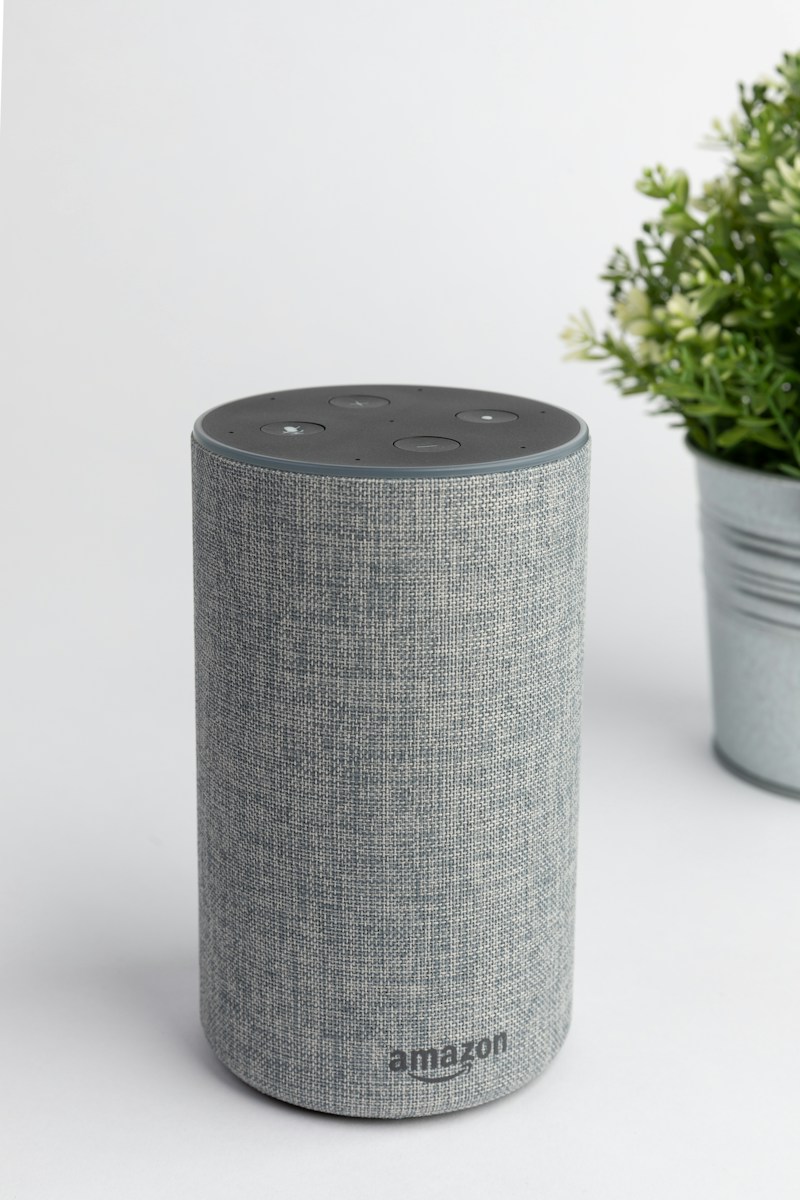
Amazon Alexa has revolutionized how we interact with technology at home. Discover hidden features and clever shortcuts that will transform your smart assistant experience.
Mastering Your Alexa Device
Explore Official Features
Most Alexa users barely scratch the surface of what their device can do. Beyond playing music and setting timers, Amazon’s voice assistant offers hundreds of powerful features that remain hidden in plain sight.
Anúncios
Whether you own an Echo Dot, Echo Show, or any Alexa-enabled device, these tricks will help you unlock productivity tools, entertainment options, and automation capabilities you never knew existed. Let’s dive into the most useful and surprising Alexa commands that will change how you use your smart speaker.
🎵 Advanced Music and Entertainment Commands
Alexa’s music capabilities extend far beyond “play my playlist.” You can create sophisticated listening experiences with precise control over your audio environment.
Anúncios
Try saying “Alexa, play music for cooking” or “Alexa, play focus music” to access curated playlists based on activities. The assistant understands contextual requests and can adapt music to your mood and situation.
For multi-room audio, you can create speaker groups in the Alexa app. Once configured, commands like “Alexa, play jazz everywhere” will synchronize music across all grouped devices simultaneously.
Want to discover new artists similar to your favorites? Ask “Alexa, play a station based on Coldplay” to generate personalized radio stations. You can also request specific decades or genres with commands like “Alexa, play 80s rock hits.”
Hidden Audio Controls
Fine-tune your listening experience with these lesser-known commands:
- “Alexa, turn on bass boost” enhances low-frequency sounds for richer audio
- “Alexa, set a sleep timer for 45 minutes” automatically stops music playback
- “Alexa, skip forward 30 seconds” works with podcasts and audiobooks
- “Alexa, what song is this?” identifies currently playing tracks
- “Alexa, follow this artist on Amazon Music” saves favorites automatically
📱 Smartphone Integration Secrets
Your Alexa device can become a powerful extension of your smartphone with proper configuration. The Alexa app transforms your speaker into a hands-free communication hub.
Enable the “Drop In” feature to use Echo devices as intercoms throughout your home. This works between rooms or even between different locations, perfect for checking in on family members.
You can send text messages entirely hands-free by saying “Alexa, send a message to Mom.” The assistant will transcribe your words and send them through the Alexa app messaging system.
Link your calendar accounts (Google, Microsoft, Apple) to have Alexa announce appointments. Command “Alexa, what’s on my calendar tomorrow?” provides a complete schedule overview without touching your phone.
Notification Management
Enable actionable notifications to receive package delivery alerts, reminders, and skill updates. When Alexa’s ring glows yellow, simply ask “Alexa, what are my notifications?” to hear them read aloud.
You can customize notification preferences for each skill individually through the Alexa app settings, ensuring you only receive alerts that matter most.
🏠 Smart Home Automation Mastery
Transform your living space into an intelligent environment with advanced Alexa routines and device grouping strategies.
Routines represent Alexa’s most powerful automation feature. Create custom sequences triggered by voice commands, schedules, or device states. For example, a “Good Morning” routine might gradually increase lights, read weather, start coffee maker, and play news briefings.
To create routines, open the Alexa app, navigate to “More” > “Routines” > “+”. You can chain multiple actions together, creating complex automation workflows without any coding knowledge.
Device groups allow simultaneous control of multiple smart home products. Saying “Alexa, turn off downstairs lights” can control dozens of bulbs with one command when properly grouped.
Conditional Automation Tricks
Advanced users can leverage wait periods and conditional logic within routines. Add pauses between actions to create staggered lighting effects or delayed appliance activation.
Use temperature sensors as routine triggers. When your smart thermostat detects certain temperatures, Alexa can automatically adjust fans, close smart blinds, or send notification alerts.
| Automation Type | Example Command | Practical Use |
|---|---|---|
| Location-Based | Triggered when leaving home | Lock doors, adjust thermostat, turn off lights |
| Schedule-Based | Daily at specific times | Morning wake-up sequences, bedtime routines |
| Device-Triggered | Motion sensor activation | Security lighting, entrance announcements |
| Voice-Activated | Custom phrase commands | Movie mode, party lighting, focus environment |
🎯 Productivity Power Features
Alexa can function as your personal assistant with powerful productivity tools that rival dedicated apps and services.
Create shopping lists collaboratively by saying “Alexa, add milk to my shopping list.” Family members with app access can view and modify the same list in real-time, perfect for household coordination.
Set location-based reminders that trigger when your phone reaches specific places. “Alexa, remind me to buy groceries when I arrive at Whole Foods” uses GPS positioning for contextual alerts.
Use the “Simon Says” feature for quick voice memos. Command “Alexa, Simon Says remember the garage code is 4827” and Alexa will repeat it back, helping commit information to memory.
Task Management Integration
Connect Alexa with popular productivity platforms like Todoist, Any.do, or AnyList. Once linked, voice commands can create tasks, set due dates, and check off completed items across synchronized devices.
Enable the “Brief Mode” setting to reduce Alexa’s verbal responses to simple chimes for routine commands, speeding up interactions when you’re focused on work.
🔒 Privacy and Security Enhancements
Protecting your privacy while using Alexa requires understanding available security features and customization options.
Voice recordings can be automatically deleted. Navigate to Settings > Alexa Privacy > Manage Your Alexa Data and choose to delete recordings after three or eighteen months, or disable saving entirely.
Create a voice profile for personalized experiences and enhanced security. Multiple household members can have individual profiles, preventing unauthorized purchases or access to personal information.
Use the mute button on your Echo device when having sensitive conversations. The physical hardware disconnection ensures the microphone cannot accidentally activate.
Guest Connect Feature
When visiting others with Echo devices, enable Guest Connect to access your music, contacts, and content without compromising the host’s settings. Simply say “Alexa, connect my account” and follow authentication steps.
Remember to disconnect before leaving by saying “Alexa, disconnect my account” to remove your personal information from the device.
🎮 Entertainment and Games Discovery
Alexa hosts thousands of interactive games, trivia challenges, and storytelling experiences accessible through simple voice commands.
Try “Alexa, play Jeopardy!” for daily trivia challenges with authentic game show experience. Other popular options include “Twenty Questions,” “Song Quiz,” and “Would You Rather.”
For children, enable FreeTime (Amazon Kids) to access age-appropriate content, educational games, and parental controls. This creates a safe entertainment environment with usage time limits.
Interactive stories adapt based on your choices. Say “Alexa, open Choose Your Own Adventure” to experience branching narratives where your decisions shape the outcome.
Custom Skills Worth Exploring
- Sleep Sounds: White noise, rain sounds, and ambient environments for better rest
- 7-Minute Workout: Guided exercise routines with voice instructions
- Food Network Kitchen: Step-by-step cooking instructions hands-free
- Big Sky: Personalized meditation and mindfulness sessions
- Daily Affirmations: Motivational messages and positive thinking prompts
🌐 Multi-Language and Translation Tools
Alexa supports dozens of languages and can serve as a real-time translation assistant for international communication.
Enable multilingual mode to switch between two languages seamlessly. Alexa can understand and respond in English and Spanish simultaneously, perfect for bilingual households.
For translations, simply ask “Alexa, how do you say ‘where is the bathroom’ in French?” The assistant provides accurate translations with proper pronunciation.
Language learning skills like “Translated” or “Daily Dose” offer vocabulary practice, phrase repetition, and conversational exercises to build fluency over time.
📞 Communication Hub Capabilities
Transform your Echo into a complete communication center with calling, messaging, and announcement features.
Make hands-free calls to any phone number in the US, Canada, and Mexico by saying “Alexa, call Dad’s mobile.” Contacts sync automatically from your smartphone for easy access.
The announcement feature broadcasts messages to all Echo devices simultaneously. “Alexa, announce dinner is ready” sends your voice to every room where an Echo is installed.
Video calling works on Echo Show devices through the built-in camera. Commands like “Alexa, video call Grandma” initiate face-to-face conversations without opening apps.
Drop-In Privacy Settings
While Drop-In enables instant connections, you control who has permission. Adjust settings in the Alexa app to allow only specific contacts or disable the feature entirely for privacy.
⚡ Energy Monitoring and Efficiency
Smart plugs combined with Alexa create powerful energy management systems that reduce electricity consumption and lower utility bills.
Compatible smart plugs track energy usage for connected devices. Ask “Alexa, how much energy is my coffee maker using?” to receive real-time consumption data.
Schedule power-hungry devices to operate during off-peak hours when electricity rates are lower. Create routines that activate heaters, chargers, or appliances only when cost-effective.
Energy monitoring skills like “Energy Dashboard” aggregate consumption across all smart devices, providing insights into usage patterns and optimization opportunities.
🍳 Kitchen Assistant Features
Cooking becomes effortless with Alexa’s culinary capabilities, from unit conversions to recipe guidance and timers.
Set multiple named timers simultaneously: “Alexa, set a pasta timer for 11 minutes” and “Alexa, set a sauce timer for 20 minutes.” Check status by asking “Alexa, how much time is left on the pasta timer?”
Unit conversions happen instantly: “Alexa, how many tablespoons are in a quarter cup?” saves time during recipe preparation without touching your phone with messy hands.
Enable recipe skills like Allrecipes or Food Network to receive step-by-step cooking instructions. Echo Show devices display visual guides alongside voice directions for complex techniques.
🚗 Vehicle Integration Possibilities
Several car manufacturers now integrate Alexa directly into vehicle infotainment systems, extending smart home control to the road.
Using Alexa Auto (a dedicated device or app), you can check smart home status while driving. “Alexa, did I lock the front door?” or “Alexa, turn on the porch lights” provide peace of mind during commutes.
Navigation integration works with compatible vehicles: “Alexa, navigate to the nearest gas station” initiates turn-by-turn directions through your car’s system.
Control entertainment options hands-free while keeping eyes on the road. Voice commands access music, podcasts, audiobooks, and radio without touching screens.
🎓 Educational and Learning Resources
Alexa serves as an on-demand educational resource for curious minds of all ages, offering instant access to information and learning tools.
Ask complex questions and receive detailed explanations: “Alexa, explain photosynthesis” or “Alexa, what causes rainbows?” The assistant pulls information from knowledge databases to provide accurate answers.
Language learning becomes interactive with pronunciation practice. “Alexa, teach me Spanish” activates daily lessons with vocabulary building and conversational practice.
Math assistance helps with calculations and problem-solving: “Alexa, what’s 17 percent of 230?” or “Alexa, solve for x when 3x plus 7 equals 22.”
Kid-Friendly Learning Skills
Educational skills designed for children make learning entertaining. “National Geographic Quiz” tests geography knowledge, while “Math Facts” builds arithmetic skills through gamification.
Bedtime stories and educational podcasts provide screen-free entertainment that encourages imagination and comprehension development.
🔧 Troubleshooting and Optimization Tips
Maximize Alexa performance by addressing common issues and implementing optimization strategies for better responsiveness.
If Alexa misunderstands commands frequently, retrain voice recognition through the app. Navigate to Settings > Your Profile > Voice to complete the voice training module, improving accuracy significantly.
Wi-Fi connectivity issues often cause delayed responses. Position Echo devices away from electronic interference sources like microwaves, baby monitors, or cordless phones. Switching to 5GHz networks reduces congestion.
Regular device restarts clear temporary glitches. Unplug your Echo for 30 seconds monthly to refresh system processes and improve overall performance.
Check for software updates manually in the Alexa app under Device Settings. Keeping firmware current ensures access to latest features and security patches.

🎉 Creative and Unexpected Uses
Beyond practical applications, Alexa offers entertaining and creative features that showcase the technology’s versatility.
Easter eggs add personality to your assistant. Try “Alexa, do you know Siri?” or “Alexa, tell me a joke” for humorous responses. Ask “Alexa, what’s the first rule of Fight Club?” for pop culture references.
Sound effects enhance storytelling and ambiance. Commands like “Alexa, play thunderstorm sounds” or “Alexa, open ambient noise” create atmospheric backgrounds for relaxation, focus, or sleep.
Holiday-specific features activate seasonally. During December, ask “Alexa, call Santa” or “Alexa, sing Jingle Bells” for festive interactions that delight children and adults alike.
Random decision-making assistance helps when you’re indecisive: “Alexa, flip a coin,” “Alexa, roll a six-sided die,” or “Alexa, pick a number between one and ten.”
Voice shopping enables quick reordering through Amazon. “Alexa, reorder paper towels” uses your purchase history to add items directly to cart with confirmation required before finalizing.
The true power of Alexa lies not in individual features but in combining multiple capabilities to create personalized smart home ecosystems. Experiment with different commands, explore new skills weekly, and customize routines to match your lifestyle. As Amazon continues expanding Alexa’s intelligence, staying curious about new features ensures you’re always maximizing your device’s potential and discovering innovative ways to simplify daily tasks through voice technology.
